
What Does By Mention Mean on Snapchat?
“By mention” on Snapchat means someone tagged your username (@yourname) in their Story or Snap. When you see “Added by Mention” under a friend request, it means that person found your profile by tapping your tagged username inside someone else’s Snap or Story. They did not search for you manually. When you see “by mention” in your story views, it means a viewer arrived at your story because someone tagged your username in another piece of content.

You opened Snapchat, and something caught your eye. Maybe it was a friend request with a small label underneath that said: “Added by Mention.” Maybe you were scrolling through your story views and spotted the phrase “by mention” next to someone’s name. Either way, you had the same reaction most people do — confusion.
Snapchat does not explain what this label means anywhere inside the app. It just shows up, leaves you wondering, and moves on. If you have ever thought, “I don’t remember anyone tagging me” or “how did a stranger find my profile?” this guide answers every version of that question, completely and honestly.
1. What Does “By Mention” Mean on Snapchat?
At its core, “by mention” on Snapchat means someone used the @ symbol followed by your username to tag you inside a Snap, Story, or group chat. When your username is mentioned this way, it becomes a tappable link that anyone who sees the content can tap to land directly on your Snapchat profile.
According to Snapchat’s own support documentation, the mention feature allows users to tag friends in content so viewers can discover and connect with them. Think of it exactly like tagging on Instagram or X (formerly Twitter), same concept, Snapchat’s version.
Simple Definition: By Mention = Someone typed @yourusername in their Story or Snap. Your name became a clickable link. Other people could tap it to find your profile and potentially add you as a friend.
What makes Snapchat’s version slightly different from other platforms is how tightly it is connected to the friend-adding system. When someone taps your mention and adds you, Snapchat logs that entire path — and that is what creates the “Added by Mention” label you see on the friend request.
2. Two Different Contexts: Story Views vs Friend Requests
This is the part that creates the most confusion, and it is where most other articles fall short. “By mention” appears in two completely different places on Snapchat, and each one means something slightly different.
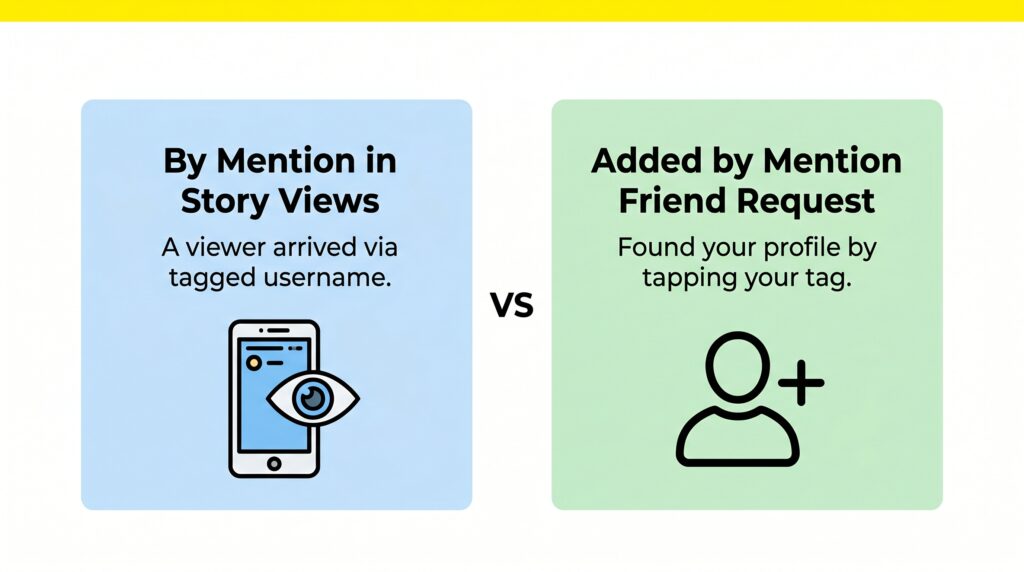
👁️ In Your Story Views
A viewer arrived at your Snapchat story because someone tagged your @username in another piece of Snapchat content. They did not find you through search — someone else’s content led them to you.
👤 On a Friend Request
That person found your profile by tapping your tagged @username inside someone else’s Snap or Story. Snapchat labels the request “Added by Mention,” so you know exactly how they discovered you.
| Where You See It | What It Means | What To Do |
|---|---|---|
| In your Story views list | Viewer arrived via tagged username in other content | Note who is finding you through mentions |
| Under a friend request | Found your profile by tapping your tag in someone’s Snap/Story | Accept, ignore, or block based on who sent it |
Both are caused by the same underlying action. Someone is tagging your username, but the notification appears in different places depending on what they did after tapping your profile.
3. What Does “Added by Mention” Mean on Snapchat?
“Added by Mention” is the label Snapchat puts under a friend request when the person who sent it found you through a mention, not through search, not through Quick Add, not through contacts. They were watching someone else’s Snap or Story, your username appeared as a tag, they tapped it, and they sent you a friend request from your profile page.
As snappalnetsy.org explains in their June 2026 guide: “When Snapchat shows ‘Added by Mention’ under a friend request, it means that person found your profile by tapping your tagged username inside someone’s Snap or Story. They didn’t search for you manually. Your username appeared in content they were already viewing, they tapped it, and your profile opened up right there.”
What “Added by Mention” Does NOT Mean:
- It does NOT mean they know you personally
- It does NOT mean they searched your name
- It does NOT mean someone was publicly talking about you
- It does NOT mean your private content was exposed
- It does NOT mean anything is wrong with your account
The label is purely informational. Snapchat built it as a transparency tool, so you always know how someone found your profile. Whether you accept the request is entirely up to you.
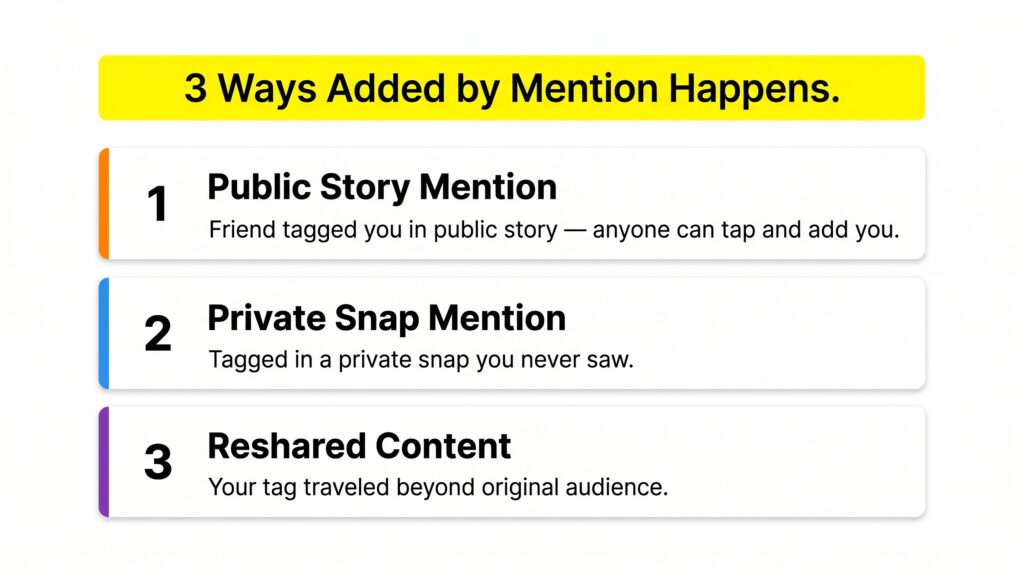
4. Three Ways “Added by Mention” Can Happen
Most people assume there is only one way this happens — a friend publicly tagged them in a story. But there are actually three distinct ways the “Added by Mention” label gets triggered, and two of them often catch people completely off guard.
🟠 Way 1 — Most Common: Public Story Mention
A friend creates a Story with your @username tagged inside it. That Story is public — anyone on Snapchat who sees it can tap your name. If a stranger (or someone you know) taps and adds you, you get the “Added by Mention” notification. This is by far the most frequent reason the label appears.
🔵 Way 2 — Surprises Most People: Private Snap Mention
Someone sends a private Snap — a one-on-one message — to a friend, and tags your username inside it. The recipient of that private Snap sees your tagged name, taps it, finds your profile, and sends you a request. You were never in that conversation. You may not even know either person. But the system still records it as “Added by Mention.”
Why Way 2 Feels So Confusing: When someone finds you through a private Snap mention, you have no way to see the original content — it was private and possibly sent to someone you do not know. This is the most common reason people receive “Added by Mention” requests from complete strangers.
🟣 Way 3 — Extended Reach: Reshared or Forwarded Content
Snapchat content sometimes travels beyond its original audience. If someone forwards a Snap or Story that includes your tagged username, people in that extended chain can tap your profile too. Your username essentially travels further than either you or the original poster expected.
5. Added by Mention vs Other Snapchat Add Sources
Snapchat shows you the source of every friend request, so you always know how someone found you. “Added by Mention” is just one of several labels you might see. Here is how it compares to all the others:
| Add Source Label | What It Actually Means | Requires Your Action? |
|---|---|---|
| Added by Mention | Found you via a tagged @username in a Snap or Story | No |
| Added by Search | Manually typed your username in the search bar | No |
| Added by Quick Add | Snapchat’s algorithm suggested you based on mutual friends | No |
| Added from Contacts | Your phone number matched their synced contacts list | No — contact sync must be on |
| Added by Snapcode | Scanned your unique QR-style Snapcode | You share the code first |
| Added by Username | Found you by directly searching your exact username | No |
Key Difference to Remember: Added by Mention = content discovery, your username was in something they were watching. Added by Search = intentional discovery, they came looking for you specifically. Mention is passive. Search is active.
6. Added by Mention from a Stranger: Is It Safe?
Getting a friend request from someone you have never heard of, labeled “Added by Mention,” can feel unsettling. Here is an honest assessment of whether it is something to worry about.
The Short Answer: The label itself is safe. It just describes how they found you. However, the person behind the request could be anyone, and whether you accept is a personal decision based on your comfort level.
What Happens If You Accept?
If you accept, they gain standard friend access, they can see your Stories, send you Snaps, and message you in chat. They do not gain any special or elevated access beyond what any other Snapchat friend would have.
What Happens If You Ignore?
Ignoring means they stay in your pending requests without being accepted. They cannot see your private Stories or send you messages. You can also block them if you want to prevent any future contact entirely.
Signs to Be More Cautious:
- The username looks like a spam or bot account, with random letters and numbers.
- You received multiple “Added by Mention” requests in a short period from strangers.
- The account has no profile picture, no Snap Score, or appears newly created.
- You never shared your Snapchat username publicly anywhere.
7. Why Did I Get “Added by Mention” But Nobody Tagged Me?
This is the most searched follow-up question on this topic, and the most frustrating one. You got the notification. You looked around. You cannot find anyone who tagged you. Here is exactly why that happens:
The Story Expired Before You Could See It
Snapchat Stories disappear after 24 hours. Your friend tagged you in their Story, someone tapped your profile and added you — and by the time you logged in, the Story was already gone. This is the single most common explanation. You cannot see the source because the source no longer exists.
You Were Not in the Original Audience
Some Stories are shared with a custom list of people. Your username was tagged in a Story you were never allowed to see, but a viewer who was in that audience could still tap your profile from it. The mention happened in content you had no access to.
Snapchat’s Attribution Delay
Sometimes a user discovers your profile through a mention, then comes back and adds you hours or even days later. Snapchat still assigns the first known discovery path as the label. The result can feel disconnected from your recent activity.
The Auto-Suggestion Possibility
When someone types “@” in a Snap, Snapchat suggests usernames from their contacts. If your username appeared as a suggestion and was accidentally tapped, the system may still register it as a mention-based discovery in some cases.
Bottom Line: If you received “Added by Mention” but cannot find the source, it is almost certainly an expired Story. The content is gone, but Snapchat still recorded how that person found you. There is nothing wrong with your account.
8. By Mention Notification Not Going Away: How to Fix It
Some users report that the “Added by Mention” notification or the pending friend request keeps reappearing or simply will not clear. If you are dealing with this, here are the most common reasons and exact fixes:
1. Pending Request Not Resolved
The most common reason the notification stays is that you have not actually accepted, ignored, or blocked the request. Snapchat keeps the notification active until you take action.
Fix: Go to your friend requests, find the “Added by Mention” request, and either accept or delete it.
2. Multiple Requests Coming In
If your username is tagged in a popular public Story, multiple people may be tapping your profile and adding you at different times. New requests keep appearing because new people keep finding you through the same mention.
Fix: Ask the person who tagged you to delete the Story, or change your privacy settings to limit who can contact you.
3. App Cache Issue
Outdated cached data can cause notifications to display incorrectly or repeatedly, even after you have taken action on the request.
Fix: Go to phone Settings → Apps → Snapchat → Storage → Clear Cache. Reopen Snapchat.
4. Outdated App Version
Older Snapchat versions have notification display bugs. The “by mention” label may not clear properly on outdated builds.
Fix: Update Snapchat to the latest version via App Store (iPhone) or Google Play Store (Android).
5. Temporary App Glitch
Sometimes the notification system just hiccups. The request was resolved, but the notification badge did not clear.
Fix: Force close Snapchat completely, wait 60 seconds, then reopen the app.
9. How to Use the Mention Feature on Snapchat
Now that you know what it means to be mentioned, here is exactly how to mention someone else in your own Snaps and Stories:
Method 1: Using the @ Symbol
- Take a photo or video using the Snapchat camera
- Tap anywhere on the screen to open the text tool
- Type the @ symbol followed by the username (no spaces)
- Snapchat will auto-suggest matching usernames from your friends list
- Select the correct username, then it will appear underlined, confirming it is a live tag
- Post your Snap or Story
Method 2: Using the Mention Sticker
- Take your Snap or start your Story
- Tap the sticker icon in the right-side toolbar
- Select “Mention” from the sticker options at the top
- Search for the friend you want to tag or choose from suggestions
- Position the sticker anywhere on your Snap
- Post your content
What Happens After You Mention Someone: Snapchat sends that person a notification. Their username becomes a tappable link in your content. Anyone viewing your Snap or Story can tap it to visit their profile. If your Story is public, anyone, including complete strangers, can discover it through your mention.
10. Mention vs Tag vs Shoutout: What Is the Difference?
These three terms get used interchangeably on Snapchat, but they are not all exactly the same thing. Here is how to tell them apart:
| Term | What It Means on Snapchat | Creates a Tappable Link? |
|---|---|---|
| Mention | Tagging someone with @username so their profile becomes clickable | ✅ Yes — always |
| Tag | Used interchangeably with mention — same action, different word | ✅ Yes — functionally identical |
| Shoutout | Giving credit or visibility to someone — may or may not use @ | ⚠️ Only if @ symbol is used |
As planetsofsnapchat.com correctly notes: “In simple words, ‘by mention’ and ‘tagged’ mean almost the same thing on Snapchat. There is no big technical difference. It is just different wording people use for the same action.”
The key distinction is that a shoutout can be done without creating a tappable link. You can type someone’s display name without the @ symbol. A mention always uses @ and always creates a clickable profile link.
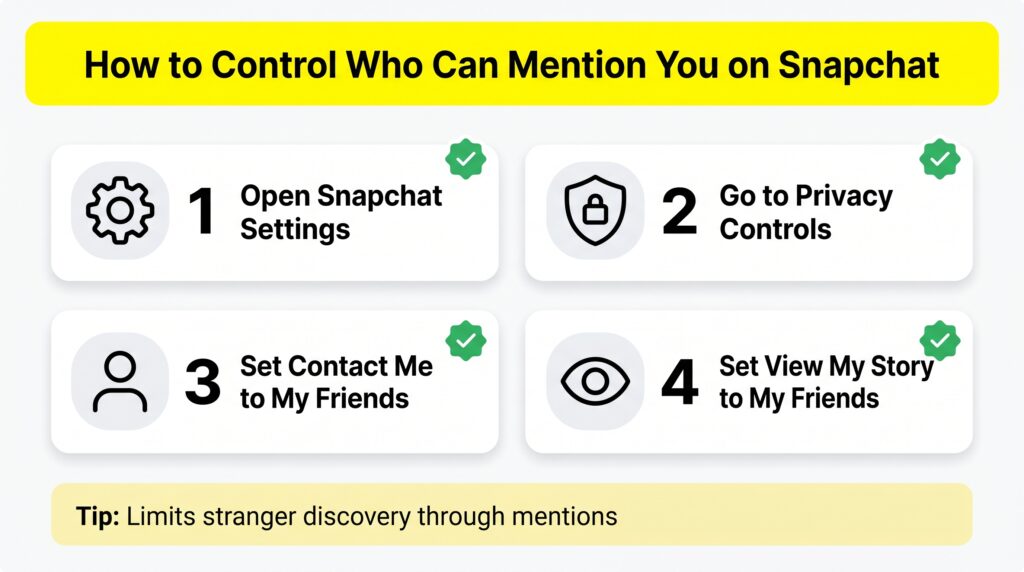
11. Privacy Settings: How to Control Who Can Mention You
If you are receiving unwanted “Added by Mention” requests or want to limit how strangers discover your profile, Snapchat gives you tools to manage this. Here is how:
On iPhone:
- Open Snapchat and tap your profile icon (top-left)
- Tap the gear icon to open Settings
- Scroll to Privacy Controls
- Tap “Contact Me” → set to “My Friends.”
- Tap “View My Story” → set to “My Friends”
On Android:
- Open Snapchat and tap your Bitmoji icon
- Tap the Settings gear
- Find Privacy Controls
- Adjust “Contact Me” and “View My Story” to “My Friends.”
Privacy Recommendations:
- Set “Contact Me” to “My Friends”: Prevents strangers from messaging after being mentioned.
- Set “View My Story” to “My Friends”: Limits story visibility, which reduces mention exposure.
- Keep your account private if you do not want to appear in public search results.
- Regularly review friend requests; do not leave unknowns pending indefinitely.
Important: Even with privacy settings on “My Friends only,” people can still tag your username in their private Snaps. However, restricting your settings means fewer strangers will encounter your tagged profile, and those who do find you will face limitations on what they can do after adding you.
12. Common Myths About “By Mention” on Snapchat | Busted
❌ Myth 1: “Added by Mention means someone was publicly talking badly about me on Snapchat.”
✅ Truth: The label only tells you how someone found your profile — through a tagged username. It says absolutely nothing about the context or tone of what was said. The content could be completely positive, neutral, or unrelated to you.
❌ Myth 2: “By mentioning in story views means the person watched my story multiple times.”
✅ Truth: “By mention” in story views only tells you how that viewer arrived at your story — through a tagged username. It has nothing to do with rewatch count. The 👀 Story Rewatch Indicator (a Snapchat+ feature) is what tracks rewatches — it is a completely separate system.
❌ Myth 3: “If I get Added by Mention from a stranger, my account has been hacked.”
✅ Truth: This is not a sign of hacking or any security issue. It simply means someone in your extended social network tagged your username in content that reached a stranger. Your account is completely secure.
❌ Myth 4: “Scanning a Snapcode and adding someone also creates an ‘Added by Mention’ label.”
✅ Truth: Incorrect. Scanning a Snapcode creates an “Added by Snapcode” label — not “Added by Mention.” These are completely separate discovery paths. Some older articles incorrectly conflate these two.
❌ Myth 5: “You can see exactly who mentioned you and in which Snap or Story.”
✅ Truth: Snapchat sends you a notification when you are mentioned, but it does not always specify which piece of content your username appeared in — especially if that content has already expired within the 24-hour window.
❌ Myth 6: “Only your friends can mention you on Snapchat.”
✅ Truth: If your account is public, anyone can type your username and mention you in their content. Only if your account is private are mentions typically limited to existing friends. This is controlled through your privacy settings.
13. Real Forum Questions | Answered Honestly
After analyzing community discussions from GetAssist Forum, Reddit, Snapchat threads, and other Q&A communities, here are the most common real questions people are asking with accurate answers:
📋 GetAssist Forum — March 2025 (forum.getassist.net)
Q: “What does by mention mean on Snapchat?”
“In the Snapchat application, ‘mention’ refers to the feature of tagging a friend on your story or in the chat section using their account username preceded by ‘@’. It will be received, and the options to open it or reply to it will be available.”
Our assessment: This answer covers the basic mechanics correctly, but misses two important things: it does not explain the “Added by Mention” friend request context, and it does not explain why someone might receive this notification from a complete stranger whose content they never saw.
💬 Reddit — Common Question
Q: “I got added by mention, but I never saw any story that tagged me. Is this a glitch?”
Almost certainly not a glitch. The most likely explanation is that your username was tagged in a Story that expired before you saw it, or in a private Snap you were never shown. The person who added you saw the tag — you just never had access to the original content.
💬 Community Forums — Frequent Confusion
Q: “Does ‘by mention’ mean someone viewed my story through a mutual friend’s profile?”
Not exactly. “By mention” means your username was specifically tagged using the @ symbol in content — creating a clickable link. Simply appearing on someone’s best friends list or having a mutual friend does not trigger a “by mention” label. The @ tag must have been used explicitly.
14. Frequently Asked Questions
Short Summary:
“By mention” on Snapchat is one of those features that feels mysterious until someone explains it clearly — and once it clicks, it makes perfect sense. The feature is Snapchat’s tagging system, and “Added by Mention” is its transparency tool for showing you exactly how people are discovering your profile.
- By mention in story views: someone arrived at your story via a tagged username in other content.
- Added by Mention on a friend request: they found your profile by tapping your tag in a Snap or Story.
- Three ways it happens: public Story, private Snap, or reshared/forwarded content.
- Cannot see the source? It probably expired. Stories last only 24 hours.
- Not going away? Accept or decline the pending request, clear the cache, or update the app.
- Control your exposure through privacy settings, set Story views, and contact permissions to My Friends.