
What Does the Green Dot Mean on Snapchat?
The green dot on Snapchat is called the Activity Indicator. It shows that a friend has been active on the app recently, but that does not mean they are online in real time. The green dot can stay visible for up to 24 hours, and in some cases up to 48 hours, after someone last used Snapchat. It does not confirm they are reading your message, and it is completely different from the colored emojis you see next to friends’ names or the eyes that appear on stories.

You are scrolling through your Snapchat friend list, and you spot it. A small green dot sitting quietly next to someone’s Bitmoji. Instantly, your brain does what every brain trained on modern messaging apps does: “They’re online. They’re available. Maybe they’ll see my message right now.”
Here’s the thing: that instinct is not wrong to have. It is actually a completely reasonable assumption based on how most of the apps you use every day work. The problem is that Snapchat’s green dot does not work quite the same way those other platforms do, and that small difference is the source of more confusion, more overthinking, and more “why aren’t they replying” anxiety than almost any other feature on the app.
1. Your First Instinct Is Not Wrong | Here’s Why?
Before explaining what the green dot actually does, it’s worth validating something important: if you assumed the green dot meant “this person is online right now,” you were thinking exactly the way the app’s visual design encourages you to think.
Green has carried the meaning of “online” or “active” across the internet for over two decades. WhatsApp uses a green dot for online status. Instagram uses a green dot in direct messages to show someone is active. Facebook Messenger’s green dot means the same thing. When you see a small green light next to someone’s name or photo on basically any platform, your brain has been trained through years of repeated exposure to translate that color into one specific meaning: this person is here, right now.
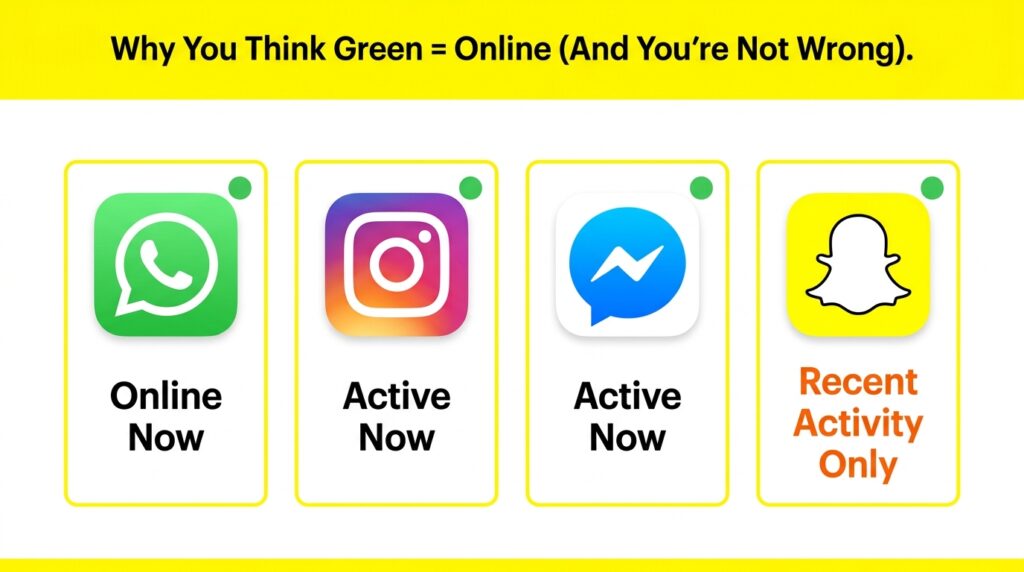
This is Real Psychology, Not a Mistake: Color association is one of the most deeply wired patterns in how humans process digital interfaces. Designers rely on this. Green almost universally signals “go,” “active,” or “available” across traffic lights, status icons, and notification systems. So when Snapchat shows you a green dot, treating it as an online signal is not a misunderstanding on your part — it is your brain correctly applying a pattern that works on nearly every other app you use.
The twist is that Snapchat deliberately built its system to work differently, and once you understand why, the green dot stops being confusing and starts being genuinely useful.
2. What Does the Green Dot Actually Mean on Snapchat?
The green dot on Snapchat is officially called the Activity Indicator. According to Snapchat’s own support documentation, it shows that a friend has been recently active on the app, which is a meaningfully different claim than “currently online.”
Official Definition: The Activity Indicator is a feature that shows friends whether someone has used Snapchat recently. It is enabled by default and only visible to mutual friends, strangers and one way follows cannot see your activity status.
Snapchat made a deliberate design choice here. Unlike WhatsApp or Facebook Messenger, which show a traditional “last seen” timestamp or live online status, Snapchat intentionally avoids exposing precise real-time presence. Instead, it uses what is essentially a privacy-first activity signal, general enough to be useful, vague enough to protect users from feeling watched or tracked.
This same privacy-conscious design philosophy shows up throughout Snapchat’s other features too, including how Snapchat Planets rank your closest friendships without revealing exact interaction timestamps, or how the rewatch indicator works on stories without naming who specifically rewatched your content.
3. Where Does the Green Dot Appear on Snapchat?
The green dot shows up in a few different spots within the app, and the meaning stays largely consistent across all of them — though the exact behavior can vary slightly depending on where you see it.
| Location | What It Indicates |
|---|---|
| Quick Add page | Suggested friend has been active recently — encourages you to add them while they’re around |
| Chat screen/friend list | That friend has used the app within the recent activity window |
| Bitmoji on profile | Same recent-activity meaning, shown next to their avatar |
| Top of your own screen | A completely different green dot — this one means your camera is actively in use (a privacy/permission indicator, not an activity one) |
Important Distinction: The green dot at the very top of your phone’s screen (often near the signal bars) is an iOS or Android system indicator showing that an app is using your camera or microphone — it has nothing to do with Snapchat’s friend Activity Indicator. Do not confuse the two; they look similar but mean completely different things.
4. How Long Does the Green Dot Stay on Snapchat?
This is one of the most searched questions about this feature, and the honest answer involves a range rather than one fixed number, because Snapchat has never published an exact official duration.
Based on consistent reporting across multiple sources and real user testing, here is the most accurate breakdown available:
| Scenario | How Long Does the Green Dot Stay |
|---|---|
| Actively using the app right now | Visible while open, plus roughly 3–5 minutes after closing |
| Used the app within the last few hours | Typically remains visible, sometimes showing a timestamp like “5h” |
| Used the app sometime in the last 24 hours | Can still be visible — this is the most commonly cited window |
| Background app refresh occurred | Can extend visibility up to 48 hours in some cases, due to background processing |
| No activity for more than 24-48 hours | The green dot disappears automatically |
The Timestamp Trick: Sometimes, instead of just a plain green dot, Snapchat shows a small time label like “22m” or “5h” next to a friend’s name. This is Snapchat being more specific. It means they were active 22 minutes ago or 5 hours ago. If you see this timestamp, it is more precise and more useful than the dot alone.
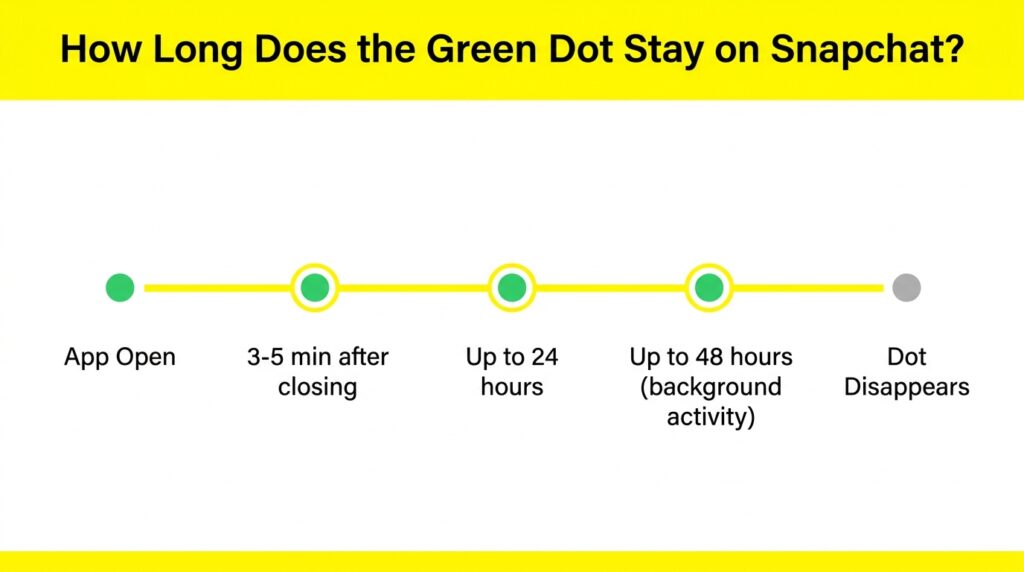
The 24-to-48-hour window is exactly why the green dot should never be treated as a live presence indicator. Someone could have opened Snapchat once yesterday morning, closed it immediately, and still show a green dot late into the next day because of how the activity window and background processing work.
5. Is the Green Dot on Snapchat Accurate?
Generally, the green dot is reasonably reliable as a recent-activity signal, but it is not a precise, real-time accuracy tool, and there are specific reasons it can mislead you.
Why the Green Dot Can Be Inaccurate?
- Background app refresh: If Snapchat refreshes in the background on someone’s phone, it can register as activity even though the person never opened the app
- Server delays: Snapchat’s servers process activity signals with some lag; there can be a gap between actual usage and what you see displayed
- Cached data: Your own app might be showing slightly outdated information if your phone hasn’t synced recently
- Slow internet connections: Poor connectivity on either end can delay how quickly activity status updates.
Bottom Line on Accuracy: The green dot is a useful general signal — but treat it as “this person was probably active sometime recently,” not “this person is definitely online this exact second.” For genuinely real-time confirmation, Snapchat does offer a faster, more reliable signal: a blue dot that appears specifically inside an open chat window and disappears the instant someone closes that conversation.
6. Does the Green Dot Mean They Are Reading My Message?
No, and this is one of the most important clarifications in this entire topic. The green dot only confirms general recent activity on the app. It does not confirm that the person has opened your specific chat, read your specific message, or is looking at your specific story.
Someone with a green dot showing could be:
- Watching Snapchat Spotlight videos.
- Checking their friends’ stories (where a purple circle would indicate unwatched content).
- Browsing Snap Map.
- Checking their friend emojis and streaks.
- Replying to a completely different friend’s message.
- Simply having the app open in the background without actively doing anything.
If you genuinely need to know whether someone has opened your specific message, the most reliable confirmation comes from the delivery status icons in your chat, not the green dot.
7. Green Dot Showing But They’re Not Replying | Why?
This is the scenario that creates the most overthinking, and it deserves an honest, calm explanation rather than speculation.
If you see a green dot next to someone’s name and they have not responded to your message, the most likely explanations — in order of probability — are:
- They’re active elsewhere in the app, not in your chat. Remember, the green dot reflects general app activity, not specific conversation engagement.
- The dot is showing residual activity from up to 24-48 hours ago. They may have genuinely closed the app a while back, and you are seeing a lingering signal rather than current use.
- They saw your message and are composing a response, or simply have not gotten to it yet, despite the app being open.
- Background app refresh triggered the dot without them ever consciously opening Snapchat.
A Word on This Emotionally: It is completely understandable to feel a small sting when you see a green dot and no reply comes. But given everything explained above about how unreliable real-time inference from this dot actually is, reading deep meaning into “active but not replying” is rarely going to give you an accurate picture of what is actually happening. The dot simply isn’t built for that kind of precision.
8. How to Turn Off the Green Dot on Snapchat?
If you would rather not broadcast your recent activity to friends, Snapchat makes this easy to disable; and it is a completely free privacy setting available to every user, with or without Snapchat+.
Steps to Turn Off the Activity Indicator:
- Open Snapchat and tap your profile icon / Bitmoji (top-left corner)
- Tap the gear icon to open Settings
- Scroll down to Privacy Controls
- Tap “Activity Indicator”
- Toggle the switch off
Important: Turning this off hides your green dot from others, but you will still be able to see the green dot on your friends’ profiles, unless they have also disabled it on their end. The setting only controls your own visibility, not what you can see of others.
For an even more complete privacy approach, you can also combine this with Ghost Mode on Snap Map, which lets you hide your location for 3 hours, 24 hours, or indefinitely. Activity Indicator and Ghost Mode work independently, but using both together gives you maximum control over what friends can infer about your activity.
9. All Snapchat Dot Colors | Green, Yellow, Blue, Purple
The green dot is just one piece of a much larger color-coded system Snapchat uses throughout the app. Confusing these colors with each other is incredibly common, so here is the complete breakdown.
🟢 Green Dot | Activity Indicator
Appears in Quick Add, Chat, and friend profiles. Means recent app activity — not live presence. Can last 24-48 hours.
🟡 Yellow Dot | Notifications
Appears on the Chat screen to indicate pending notifications, such as new friend requests or friend suggestions waiting for your attention.
🔵 Blue Dot | Real-Time Chat Presence
This one actually IS a live indicator — it appears inside an open chat window and disappears the instant the other person closes that specific conversation. This is your most reliable real-time signal.
🟣 Purple Circle | Ring — Story Notification
A completely different system covering Stories rather than activity status. For the complete breakdown of what this means — including the version with a lock icon — see our complete guide on the purple circle meaning on Snapchat.
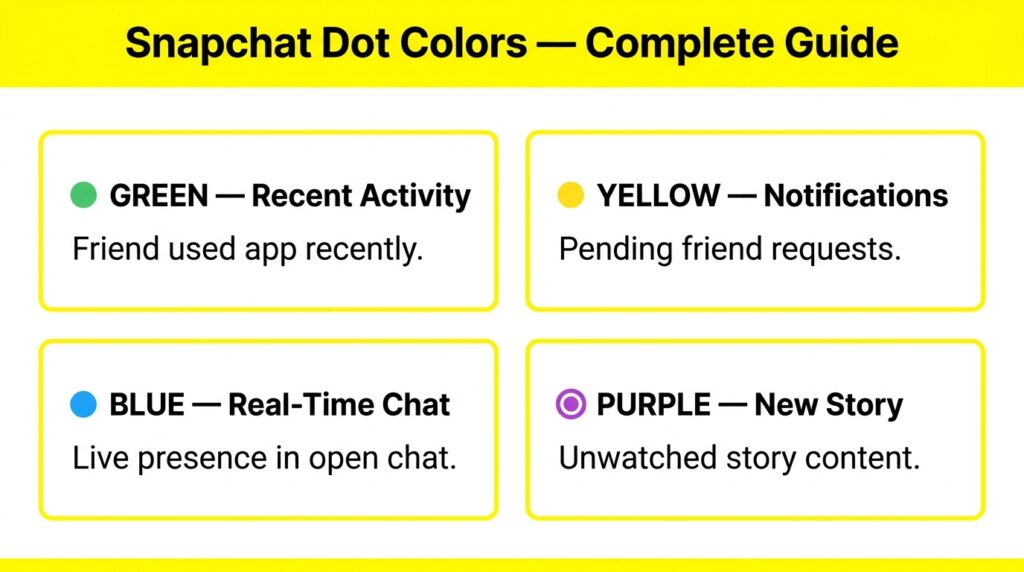
Quick Memory Trick: Green = “they were here recently.” Yellow = “something is waiting for you.” Blue = “they are in this chat right now.” Purple = “new story content exists.” Four colors, four completely different jobs.
10. Green Dot vs Last Seen | What’s the Difference?
Many users coming from WhatsApp or Facebook Messenger expect a “Last Seen” timestamp feature on Snapchat, and the comparison is worth spelling out clearly, because the platforms work fundamentally differently here.
| Feature | WhatsApp / Messenger “Last Seen” | Snapchat Green Dot |
|---|---|---|
| Shows exact time | ✅ Yes — precise timestamp | ❌ No — general window only, sometimes a rounded label like “5h” |
| Real-time accuracy | ✅ High — updates instantly | ⚠️ Approximate — can lag by hours |
| Can be hidden | ✅ Yes, in privacy settings | ✅ Yes, via Activity Indicator toggle |
| Visible to everyone or just friends | Configurable — contacts or everyone | Mutual friends only by default |
Snapchat does not have a traditional “Last Seen” feature in the way WhatsApp does. The closest equivalent is the green dot combined with the occasional timestamp label, and even then, it is intentionally less precise. This is a deliberate privacy design decision by Snap Inc., not a missing feature.
11. Green Dot on Snapchat vs Other Apps
Understanding why your instinct about the green dot felt so natural becomes even clearer when you compare it directly to how other major platforms handle the same visual signal.
| Platform | Green Dot Meaning | Real-Time? |
|---|---|---|
| User is online right now | ✅ Yes — live | |
| Facebook Messenger | User is active right now or very recently | ✅ Mostly real-time |
| User is currently using the app | ✅ Yes — live | |
| Snapchat | User was active sometime in the last 24-48 hours | ❌ No — delayed, general window |
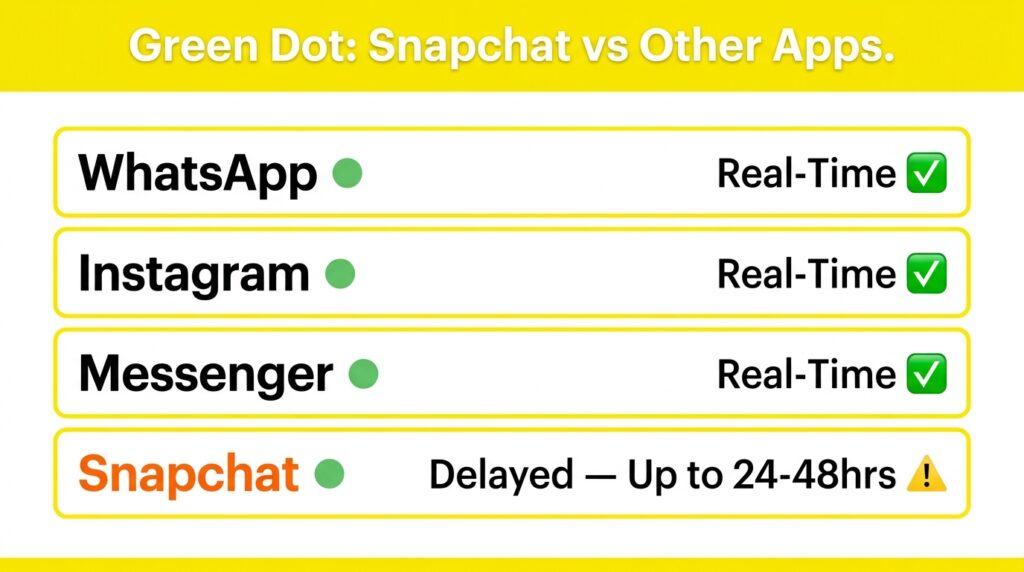
Snapchat is genuinely the outlier here among major messaging platforms. Every other app in this comparison uses green specifically for live, real-time presence. Snapchat repurposes the same familiar color for a much looser, privacy protective signal, which is exactly why so many users walk away confused the first time they encounter it.
12. Common Myths About the Green Dot | Busted
❌ Myth 1: “The green dot means someone is online right now, just like on WhatsApp.”
✅ Truth: It means recent activity within roughly the last 24-48 hours — not live presence. This is the single most important correction to make, and it is the source of most confusion around this feature.
❌ Myth 2: “If the green dot is showing, they are definitely reading my message.”
✅ Truth: The dot reflects general app activity, not specific engagement with your particular conversation. They could be anywhere else in the app entirely.
❌ Myth 3: “The green dot only appears for your closest friends.”
✅ Truth: It appears for any mutual friend, including suggested connections on the Quick Add page — not just your closest circle. It has nothing to do with friendship ranking, the way Snapchat’s Friend Solar System (Planets) feature does.
❌ Myth 4: “You need Snapchat+ to control or hide the green dot.”
✅ Truth: The Activity Indicator toggle is completely free and available to every Snapchat user, regardless of subscription status.
❌ Myth 5: “The green dot at the top of my phone screen is the same Snapchat feature.”
✅ Truth: That is your phone’s operating system indicator showing camera or microphone access — completely unrelated to Snapchat’s friend Activity Indicator, even though they look visually similar.
13. Frequently Asked Questions
Conclusion:
The green dot on Snapchat is a perfect example of a feature that feels intuitive on the surface but works differently underneath once you actually dig into it. Your instinct to read it as “online now” makes complete sense given how every other major app trains you to interpret that color, but Snapchat deliberately built something gentler and less precise, prioritizing privacy over real-time transparency.
- Green dot = recent activity within roughly 24-48 hours, not live presence.
- It does not confirm message reading or specific conversation engagement.
- It can be turned off for free through Privacy Controls → Activity Indicator.
- The blue dot inside an open chat is the actual reliable real-time signal.
- Yellow dots, purple circles, and friend emojis are all separate systems with their own distinct meanings — explore our complete Snapchat emojis meanings guide and purple circle explained guide for the full picture.